Home Data Centre Technician Resume template
Data Centre Technician resume template
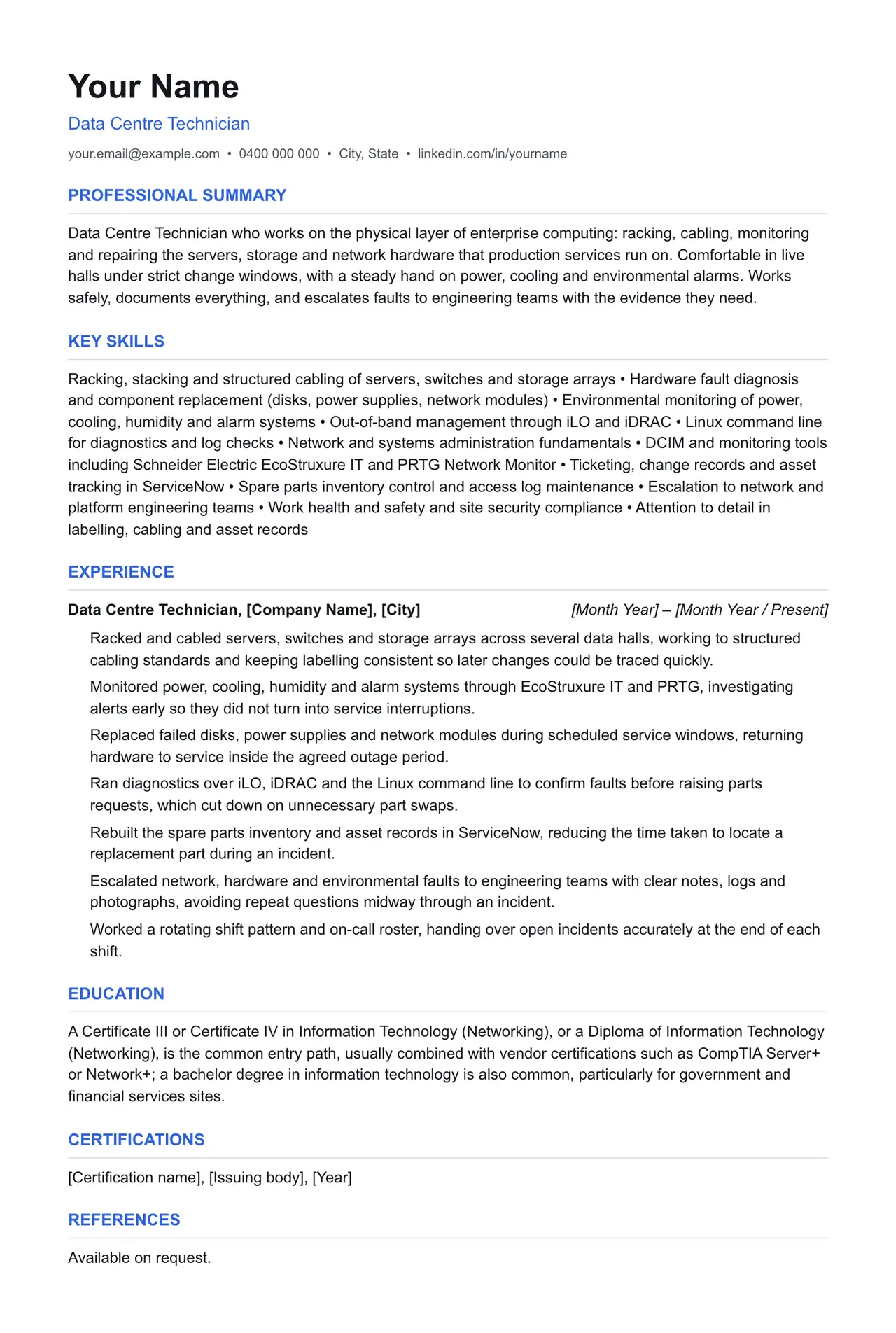
A clean starting structure with example content grounded in what data centre technicians actually do day to day, not generic filler. Download and replace the bracketed placeholders with your own details.
Which resume format should you use?
Reverse chronological
You have a steady work history. This is the format almost every recruiter and ATS expects by default.
Functional
You're changing fields or have gaps in your employment. Leads with skills rather than a job-by-job timeline.
Combination
You're early career or have worked consistently but for only a few employers. Blends a skills summary with a shorter chronological history.
This template uses the reverse chronological format: the one most data centre technicians should default to, since most Australian recruiters and ATS software expect it.
Professional summary
Data Centre Technician who works on the physical layer of enterprise computing: racking, cabling, monitoring and repairing the servers, storage and network hardware that production services run on. Comfortable in live halls under strict change windows, with a steady hand on power, cooling and environmental alarms. Works safely, documents everything, and escalates faults to engineering teams with the evidence they need.
Key skills
- Racking, stacking and structured cabling of servers, switches and storage arrays
- Hardware fault diagnosis and component replacement (disks, power supplies, network modules)
- Environmental monitoring of power, cooling, humidity and alarm systems
- Out-of-band management through iLO and iDRAC
- Linux command line for diagnostics and log checks
- Network and systems administration fundamentals
- DCIM and monitoring tools including Schneider Electric EcoStruxure IT and PRTG Network Monitor
- Ticketing, change records and asset tracking in ServiceNow
- Spare parts inventory control and access log maintenance
- Escalation to network and platform engineering teams
- Work health and safety and site security compliance
- Attention to detail in labelling, cabling and asset records
Experience: example bullet points
- Racked and cabled servers, switches and storage arrays across several data halls, working to structured cabling standards and keeping labelling consistent so later changes could be traced quickly.
- Monitored power, cooling, humidity and alarm systems through EcoStruxure IT and PRTG, investigating alerts early so they did not turn into service interruptions.
- Replaced failed disks, power supplies and network modules during scheduled service windows, returning hardware to service inside the agreed outage period.
- Ran diagnostics over iLO, iDRAC and the Linux command line to confirm faults before raising parts requests, which cut down on unnecessary part swaps.
- Rebuilt the spare parts inventory and asset records in ServiceNow, reducing the time taken to locate a replacement part during an incident.
- Escalated network, hardware and environmental faults to engineering teams with clear notes, logs and photographs, avoiding repeat questions midway through an incident.
- Worked a rotating shift pattern and on-call roster, handing over open incidents accurately at the end of each shift.
Education
A Certificate III or Certificate IV in Information Technology (Networking), or a Diploma of Information Technology (Networking), is the common entry path, usually combined with vendor certifications such as CompTIA Server+ or Network+; a bachelor degree in information technology is also common, particularly for government and financial services sites.
Keywords an ATS is likely to scan for
Applicant tracking systems match your resume against terms in the job ad before a person ever sees it. Only include the ones that actually apply to your experience, but if a term below matches something you've done, use the same wording the job ad uses.
- data centre operations
- structured cabling
- AS/NZS 3080
- fibre optic termination
- Cat6A
- DCIM
- Schneider Electric EcoStruxure IT
- ServiceNow
- PRTG Network Monitor
- iLO
- iDRAC
- Linux command line
- ITIL
- change management
- UPS
- PDU
- CRAC units
- rack and stack
- asset management
- WHS
- SafeWork Australia
- National Police Check
- Baseline security clearance
- CompTIA Server+
- ITIL 4 Foundation
Getting past ATS screening
- Match the specific skills, certifications and terms used in the job ad, not just your own wording for the same thing.
- Keep formatting simple: no tables, text boxes, columns, headers/footers or graphics. Parsers frequently drop content placed in these.
- Submit as .docx or PDF unless the job ad specifies otherwise.
- Use standard section headings (Experience, Education, Skills) rather than creative alternatives.
- List your core skills and technical competencies in their own section so a keyword scan can find them instantly.
This is a starting point, not a guarantee of interviews. Tailor every bullet point to your own real experience and the specific job ad.
Resume advice
- Skills to put on your resume (with skills finder)A resume skills section built for the job you're applying for. Search your occupation to see the specialist skills, tools and general skills it calls for, with worked examples and what to write if you have no work history yet.
- Should you put references on your resume?Whether to write references available on request on an Australian resume, what the official guidance says, and how to have a referee list ready before you need it.
- How to write a resume with no work experienceHow to write a resume with no paid work experience, with what to list instead, the order to use and example entries for school leavers and graduates.