Home IT Trainer Resume template
IT Trainer resume template
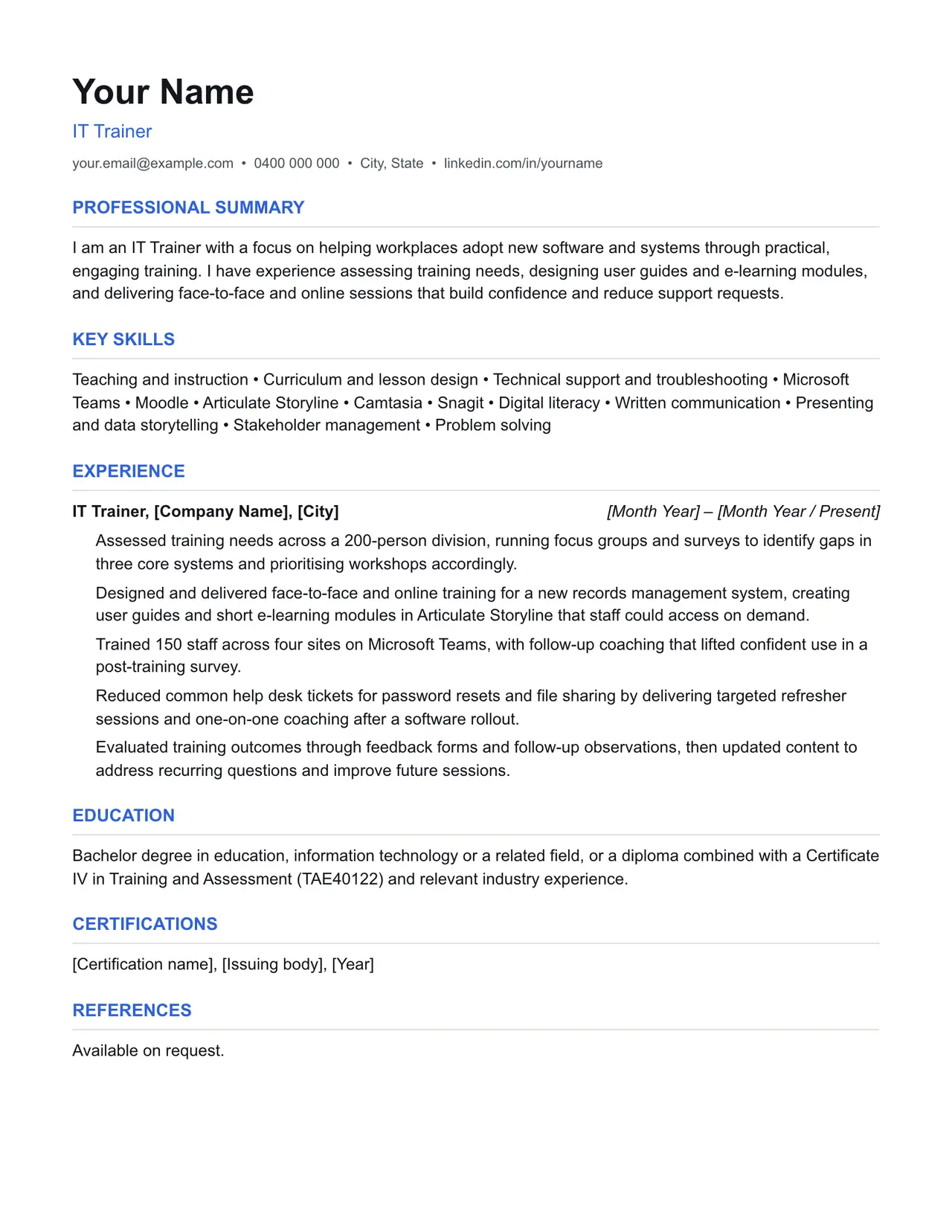
A clean starting structure with example content grounded in what it trainers actually do day to day, not generic filler. Download and replace the bracketed placeholders with your own details.
Which resume format should you use?
Reverse chronological
You have a steady work history. This is the format almost every recruiter and ATS expects by default.
Functional
You're changing fields or have gaps in your employment. Leads with skills rather than a job-by-job timeline.
Combination
You're early career or have worked consistently but for only a few employers. Blends a skills summary with a shorter chronological history.
This template uses the reverse chronological format: the one most it trainers should default to, since most Australian recruiters and ATS software expect it.
Professional summary
I am an IT Trainer with a focus on helping workplaces adopt new software and systems through practical, engaging training. I have experience assessing training needs, designing user guides and e-learning modules, and delivering face-to-face and online sessions that build confidence and reduce support requests.
Key skills
- Teaching and instruction
- Curriculum and lesson design
- Technical support and troubleshooting
- Microsoft Teams
- Moodle
- Articulate Storyline
- Camtasia
- Snagit
- Digital literacy
- Written communication
- Presenting and data storytelling
- Stakeholder management
- Problem solving
Experience: example bullet points
- Assessed training needs across a 200-person division, running focus groups and surveys to identify gaps in three core systems and prioritising workshops accordingly.
- Designed and delivered face-to-face and online training for a new records management system, creating user guides and short e-learning modules in Articulate Storyline that staff could access on demand.
- Trained 150 staff across four sites on Microsoft Teams, with follow-up coaching that lifted confident use in a post-training survey.
- Reduced common help desk tickets for password resets and file sharing by delivering targeted refresher sessions and one-on-one coaching after a software rollout.
- Evaluated training outcomes through feedback forms and follow-up observations, then updated content to address recurring questions and improve future sessions.
Education
Bachelor degree in education, information technology or a related field, or a diploma combined with a Certificate IV in Training and Assessment (TAE40122) and relevant industry experience.
Keywords an ATS is likely to scan for
Applicant tracking systems match your resume against terms in the job ad before a person ever sees it. Only include the ones that actually apply to your experience, but if a term below matches something you've done, use the same wording the job ad uses.
- Training needs analysis
- e-learning
- LMS
- Moodle
- Articulate Storyline
- Microsoft Teams
- Camtasia
- Snagit
- Certificate IV in Training and Assessment
- TAE40122
- adult learning principles
- blended learning
- face-to-face training
- online facilitation
- user guides
- software rollout
- coaching
- stakeholder management
- digital literacy
Getting past ATS screening
- Match the specific skills, certifications and terms used in the job ad, not just your own wording for the same thing.
- Keep formatting simple: no tables, text boxes, columns, headers/footers or graphics. Parsers frequently drop content placed in these.
- Submit as .docx or PDF unless the job ad specifies otherwise.
- Use standard section headings (Experience, Education, Skills) rather than creative alternatives.
- List your core skills and technical competencies in their own section so a keyword scan can find them instantly.
This is a starting point, not a guarantee of interviews. Tailor every bullet point to your own real experience and the specific job ad.
Resume advice
- Skills to put on your resume (with skills finder)A resume skills section built for the job you're applying for. Search your occupation to see the specialist skills, tools and general skills it calls for, with worked examples and what to write if you have no work history yet.
- Should you put references on your resume?Whether to write references available on request on an Australian resume, what the official guidance says, and how to have a referee list ready before you need it.
- How to write a resume with no work experienceHow to write a resume with no paid work experience, with what to list instead, the order to use and example entries for school leavers and graduates.