Home Photo Lab Technician Resume template
Photo Lab Technician resume template
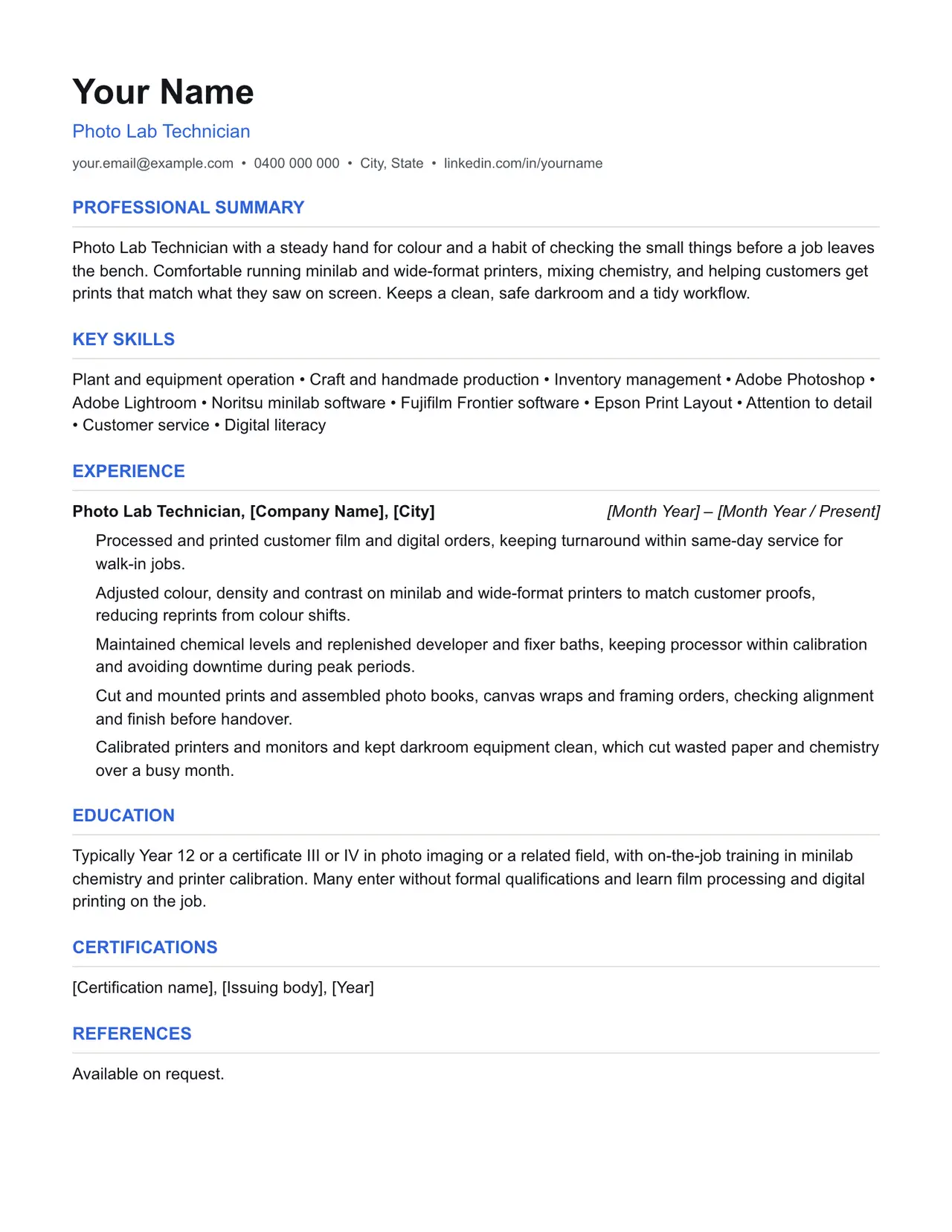
A clean starting structure with example content grounded in what photo lab technicians actually do day to day, not generic filler. Download and replace the bracketed placeholders with your own details.
Which resume format should you use?
Reverse chronological
You have a steady work history. This is the format almost every recruiter and ATS expects by default.
Functional
You're changing fields or have gaps in your employment. Leads with skills rather than a job-by-job timeline.
Combination
You're early career or have worked consistently but for only a few employers. Blends a skills summary with a shorter chronological history.
This template uses the reverse chronological format: the one most photo lab technicians should default to, since most Australian recruiters and ATS software expect it.
Professional summary
Photo Lab Technician with a steady hand for colour and a habit of checking the small things before a job leaves the bench. Comfortable running minilab and wide-format printers, mixing chemistry, and helping customers get prints that match what they saw on screen. Keeps a clean, safe darkroom and a tidy workflow.
Key skills
- Plant and equipment operation
- Craft and handmade production
- Inventory management
- Adobe Photoshop
- Adobe Lightroom
- Noritsu minilab software
- Fujifilm Frontier software
- Epson Print Layout
- Attention to detail
- Customer service
- Digital literacy
Experience: example bullet points
- Processed and printed customer film and digital orders, keeping turnaround within same-day service for walk-in jobs.
- Adjusted colour, density and contrast on minilab and wide-format printers to match customer proofs, reducing reprints from colour shifts.
- Maintained chemical levels and replenished developer and fixer baths, keeping processor within calibration and avoiding downtime during peak periods.
- Cut and mounted prints and assembled photo books, canvas wraps and framing orders, checking alignment and finish before handover.
- Calibrated printers and monitors and kept darkroom equipment clean, which cut wasted paper and chemistry over a busy month.
Education
Typically Year 12 or a certificate III or IV in photo imaging or a related field, with on-the-job training in minilab chemistry and printer calibration. Many enter without formal qualifications and learn film processing and digital printing on the job.
Keywords an ATS is likely to scan for
Applicant tracking systems match your resume against terms in the job ad before a person ever sees it. Only include the ones that actually apply to your experience, but if a term below matches something you've done, use the same wording the job ad uses.
- minilab
- film processing
- C-41
- RA-4
- darkroom
- colour correction
- density
- contrast
- Noritsu
- Fujifilm Frontier
- Adobe Photoshop
- Adobe Lightroom
- Epson Print Layout
- print finishing
- mounting
- photo books
- canvas prints
- chemical handling
- SDS
- WHS
- customer service
- inventory management
Getting past ATS screening
- Match the specific skills, certifications and terms used in the job ad, not just your own wording for the same thing.
- Keep formatting simple: no tables, text boxes, columns, headers/footers or graphics. Parsers frequently drop content placed in these.
- Submit as .docx or PDF unless the job ad specifies otherwise.
- Use standard section headings (Experience, Education, Skills) rather than creative alternatives.
- List your core skills and technical competencies in their own section so a keyword scan can find them instantly.
This is a starting point, not a guarantee of interviews. Tailor every bullet point to your own real experience and the specific job ad.
Resume advice
- Skills to put on your resume (with skills finder)A resume skills section built for the job you're applying for. Search your occupation to see the specialist skills, tools and general skills it calls for, with worked examples and what to write if you have no work history yet.
- Should you put references on your resume?Whether to write references available on request on an Australian resume, what the official guidance says, and how to have a referee list ready before you need it.
- How to write a resume with no work experienceHow to write a resume with no paid work experience, with what to list instead, the order to use and example entries for school leavers and graduates.