Home Computer Hardware Technician Resume template
Computer Hardware Technician resume template
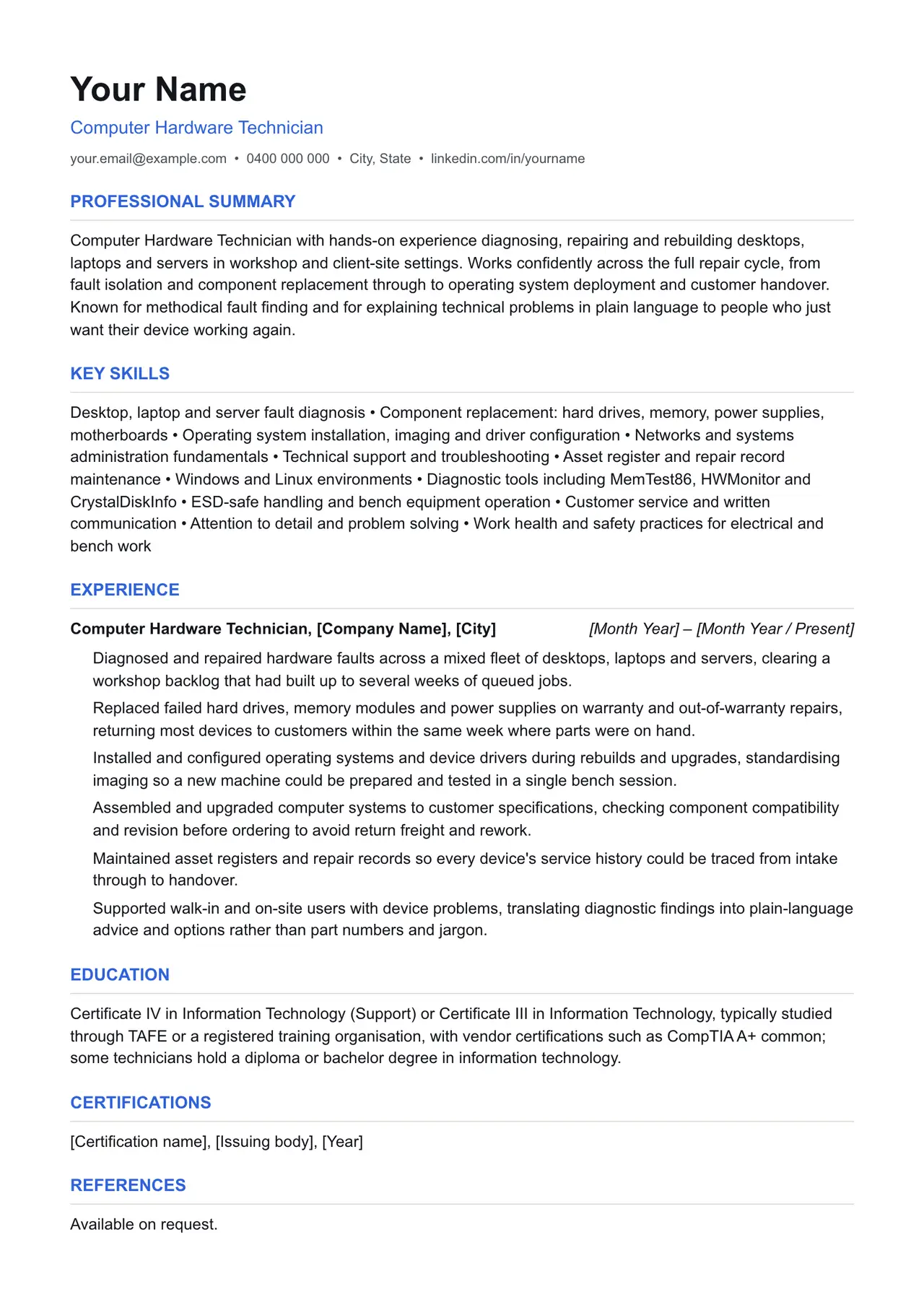
A clean starting structure with example content grounded in what computer hardware technicians actually do day to day, not generic filler. Download and replace the bracketed placeholders with your own details.
Which resume format should you use?
Reverse chronological
You have a steady work history. This is the format almost every recruiter and ATS expects by default.
Functional
You're changing fields or have gaps in your employment. Leads with skills rather than a job-by-job timeline.
Combination
You're early career or have worked consistently but for only a few employers. Blends a skills summary with a shorter chronological history.
This template uses the reverse chronological format: the one most computer hardware technicians should default to, since most Australian recruiters and ATS software expect it.
Professional summary
Computer Hardware Technician with hands-on experience diagnosing, repairing and rebuilding desktops, laptops and servers in workshop and client-site settings. Works confidently across the full repair cycle, from fault isolation and component replacement through to operating system deployment and customer handover. Known for methodical fault finding and for explaining technical problems in plain language to people who just want their device working again.
Key skills
- Desktop, laptop and server fault diagnosis
- Component replacement: hard drives, memory, power supplies, motherboards
- Operating system installation, imaging and driver configuration
- Networks and systems administration fundamentals
- Technical support and troubleshooting
- Asset register and repair record maintenance
- Windows and Linux environments
- Diagnostic tools including MemTest86, HWMonitor and CrystalDiskInfo
- ESD-safe handling and bench equipment operation
- Customer service and written communication
- Attention to detail and problem solving
- Work health and safety practices for electrical and bench work
Experience: example bullet points
- Diagnosed and repaired hardware faults across a mixed fleet of desktops, laptops and servers, clearing a workshop backlog that had built up to several weeks of queued jobs.
- Replaced failed hard drives, memory modules and power supplies on warranty and out-of-warranty repairs, returning most devices to customers within the same week where parts were on hand.
- Installed and configured operating systems and device drivers during rebuilds and upgrades, standardising imaging so a new machine could be prepared and tested in a single bench session.
- Assembled and upgraded computer systems to customer specifications, checking component compatibility and revision before ordering to avoid return freight and rework.
- Maintained asset registers and repair records so every device's service history could be traced from intake through to handover.
- Supported walk-in and on-site users with device problems, translating diagnostic findings into plain-language advice and options rather than part numbers and jargon.
Education
Certificate IV in Information Technology (Support) or Certificate III in Information Technology, typically studied through TAFE or a registered training organisation, with vendor certifications such as CompTIA A+ common; some technicians hold a diploma or bachelor degree in information technology.
Keywords an ATS is likely to scan for
Applicant tracking systems match your resume against terms in the job ad before a person ever sees it. Only include the ones that actually apply to your experience, but if a term below matches something you've done, use the same wording the job ad uses.
- CompTIA A+
- Certificate IV in Information Technology
- Certificate III in Information Technology
- AQF
- hardware fault diagnosis
- component replacement
- operating system deployment
- device drivers
- Windows
- Linux
- Active Directory
- MemTest86
- HWMonitor
- CrystalDiskInfo
- asset register
- repair records
- warranty repair
- ESD
- work health and safety
- technical support
Getting past ATS screening
- Match the specific skills, certifications and terms used in the job ad, not just your own wording for the same thing.
- Keep formatting simple: no tables, text boxes, columns, headers/footers or graphics. Parsers frequently drop content placed in these.
- Submit as .docx or PDF unless the job ad specifies otherwise.
- Use standard section headings (Experience, Education, Skills) rather than creative alternatives.
- List your core skills and technical competencies in their own section so a keyword scan can find them instantly.
This is a starting point, not a guarantee of interviews. Tailor every bullet point to your own real experience and the specific job ad.
Resume advice
- Skills to put on your resume (with skills finder)A resume skills section built for the job you're applying for. Search your occupation to see the specialist skills, tools and general skills it calls for, with worked examples and what to write if you have no work history yet.
- Should you put references on your resume?Whether to write references available on request on an Australian resume, what the official guidance says, and how to have a referee list ready before you need it.
- How to write a resume with no work experienceHow to write a resume with no paid work experience, with what to list instead, the order to use and example entries for school leavers and graduates.